
How do I set reminders, and why didn't one arrive?
Configure daily reminders and progress alerts, and check missing or silent notifications.
Daily reminders and progress notifications do not require Fasty Pro. They need notification permission, and iOS controls how and when alerts are presented.
Add a daily start reminder
- Open Statistics → Settings → Notifications & Fast Reminders.
- Use Enable notifications if Fasty needs permission. Follow the iOS prompt or check Fasty under iPhone Settings → Notifications.
- Open Fast Reminders and tap +.
- Choose a time and tap Save.
- Check that the reminder appears with its switch on.
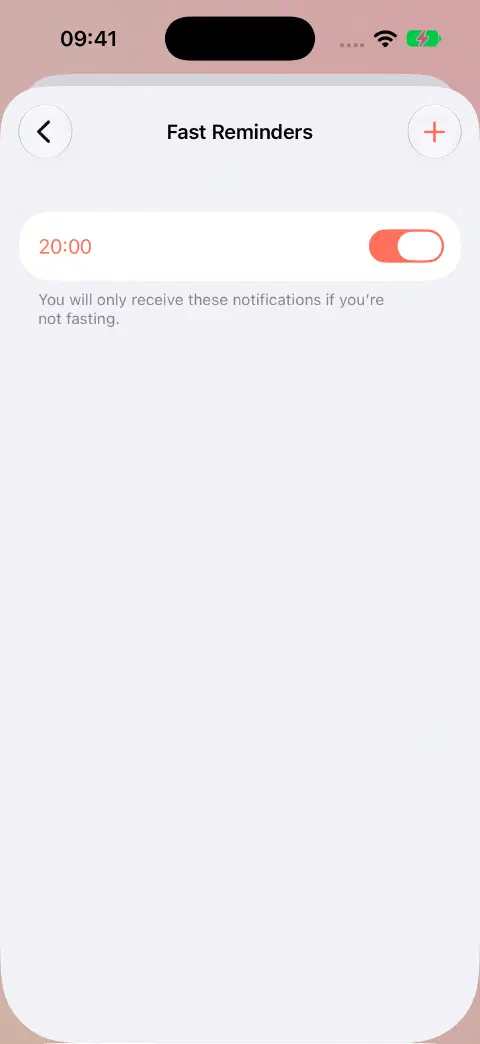
A start reminder only notifies you when you are not fasting. It does not start the timer automatically. Reminders repeat daily; this screen does not offer a different schedule for each weekday.
Choose Immediate Delivery
Use Immediate Delivery for reminders at your chosen time. Scheduled Summary can hold a start reminder until a later summary, after the time you wanted to start fasting.
- Open iPhone Settings → Notifications → Fasty and enable Allow Notifications.
- Under Notification Delivery, choose Immediate Delivery if that option is shown.
- If you use Scheduled Summary, check iPhone Settings → Notifications → Scheduled Summary and keep Fasty out of the apps included in it.
See Apple's notification settings guide for the system controls.
Change or remove a reminder
Tap the reminder's time to open its editor, choose the new time, and tap Save. Use the row's switch to pause a reminder. To remove it, open its time editor and tap Delete reminder.
Choose progress alerts
Return to Notifications and enable the alerts you want, such as Goal reached, Halfway Through, or One Hour Remaining. Eating-window alerts are separate from fasting alerts. Extra Time applies while you continue fasting beyond your goal.
Receiving a goal alert does not save or end the fast. You still end and save it in Fasty.
If a notification is missing or silent
- Confirm that the relevant reminder or progress alert is enabled in Fasty.
- For a start reminder, check whether you were already fasting at that time.
- In iPhone Settings, check Fasty's notification permission, alert locations, and Sounds if you expect an audible alert.
- Recheck Immediate Delivery and Scheduled Summary using the steps above.
- Check whether a Focus is delaying or silencing Fasty's alerts.
If it continues, please contact me with the reminder time, what you expected, whether you were fasting, and your Fasty/iOS versions. A configured reminder is not a guarantee that iOS will display an alert in every system state.
Still need a hand? Contact me.