
I forgot to start the timer. How do I correct it?
Set an ongoing fast to the time you actually started fasting.
If you are still fasting, start the timer now if it is not running, then change its start time. You do not need to wait for your next fast.
Correct the active start
- Open the fasting timer. Tap Start fast if it is not already running.
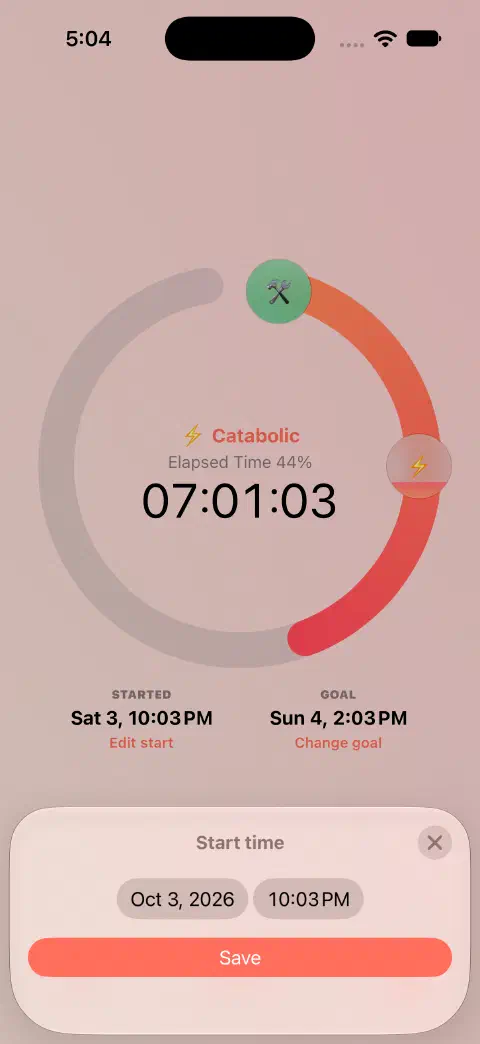
- Tap Edit start below the ring.
- Choose the date and time when you actually started. If a calendar or time picker is open, tap outside it to return to the editor.
- Tap Save. Check the Started date on the timer.
Use this route while you are still fasting. If the fast already ended, add a completed fast instead.
Check the result
The Started date and elapsed time should match your corrected start. Changing the start can also change the end time displayed for a duration goal.
If the fast already ended
If you never recorded it, add a missing fast. If a completed record exists, edit that saved record. If your timer is still running after you stopped fasting, use End fast, edit Ended fasting to the actual time, then save.
Still need a hand? Contact me.