
How do I change my fasting goal?
Choose a duration or exact end time, and save frequently used goals as presets.
You can change the timer’s goal before or during a fast. Changing the goal does not change when your fast started.
Choose a duration
- Open Fasty’s fasting timer on your iPhone.
- Tap the goal duration in the bottom toolbar to open Change fast goal.
- Choose a goal from Standard goals, or choose Pick hours under Custom goals.
- If you chose Pick hours, select a duration and tap Change fast.
The timer uses your new goal. These steps describe the controls; they do not recommend a duration.
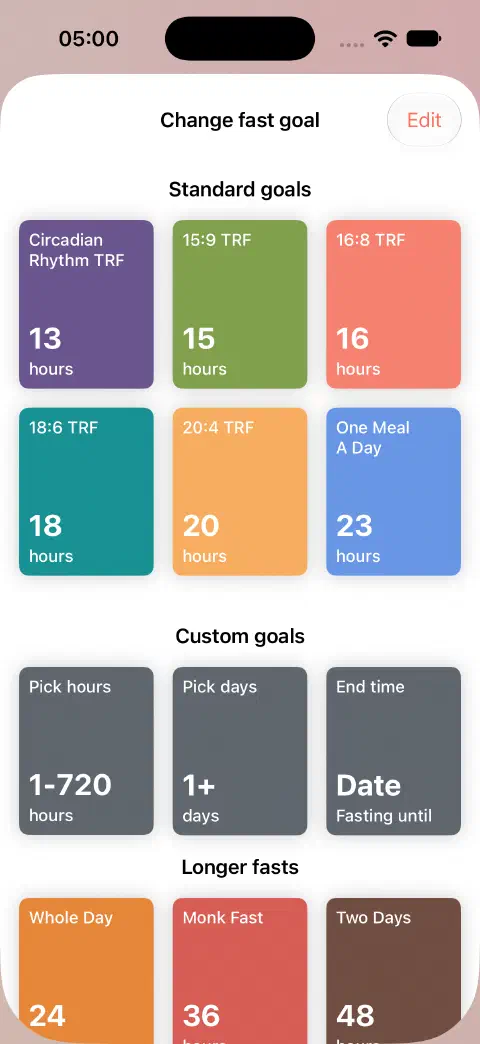
For a duration in days and hours, choose Pick days instead. The available durations are tracking options, not recommendations.
Choose an end time
- Open Change fast goal from the timer’s bottom toolbar.
- Under Custom goals, choose End time.
- Adjust the Fasting end time, then tap Save end time.
During a fast, Fasty calculates the goal duration from the fast’s start time to the end time you select. You can set the minutes as well as the hour. Check the date too, especially when the end time falls on the following day.
If a goal section is missing
Tap Edit in Change fast goal. Enable Standard goals or Custom goals to show the choices described above.
Reaching the goal
Reaching your goal does not end or save the fast automatically. The timer keeps counting until you end and save it. See starting and finishing.
Save a goal preset
Open Change fast goal → Edit → Add new preset. Enter its duration in hours and tap Save preset. Enable the presets section if it is hidden, then select a saved duration from the goal picker when you want to use it again.
Use Edit in the preset editor to remove a preset. Applying saved personal presets has a separate paid-access requirement from choosing an ordinary custom duration.
Goal changes and Fasty Pro
Choosing a standard duration, custom duration, or end time in this iPhone goal picker does not require Fasty Pro. Additional paid Shortcuts actions have their own access requirements. Applying a saved personal goal preset is also separate from entering a custom duration and may require paid access. This guide covers the ordinary in-app duration and end-time controls.
Still need a hand? Contact me.