
How do I set up workout-adjusted fasting zones?
Enable the adjustment, supply its Health inputs, and check what is missing if it does not work.
Workout adjustment changes Fasty's estimated fasting zones. It does not change your actual elapsed time, remaining time, or goal progress ring. Enabling it requires Fasty Pro or qualifying earlier access.
Set it up
- Open Statistics → Settings → Adjusted fasting zones.
- Enable Exercise adj. fasting zones if you want this feature.
- Check Recent workouts and Recent resting energy. If Fasty shows missing requirements, follow the Health permission request and check that those data types exist in Apple Health.
- After changing Health permissions, restart Fasty and revisit this screen.
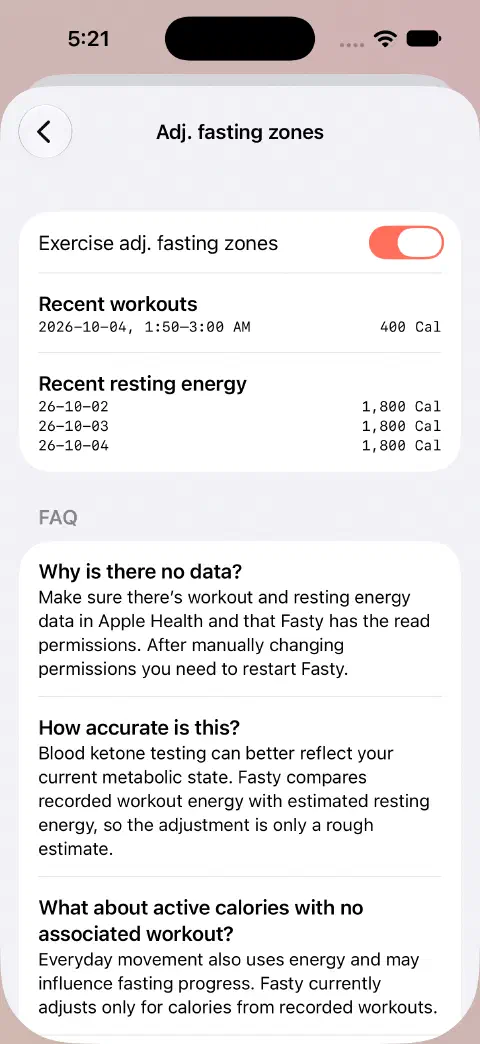
If the adjustment does not appear
Check that you have all of these inputs:
- A recorded workout with energy burned data (calories). Check that a workout appears under Recent workouts in Fasty with a calorie value, such as 400 Cal.
- Resting-energy data, used to estimate the baseline energy rate.
- A workout that overlaps the fast you are checking.
- Permission for Fasty to read the required Health data.
Everyday active calories or steps without an associated recorded workout are not used by this adjustment. Workout duration alone is not the input: Fasty compares workout energy with estimated resting energy.
If nothing changes, first check the two recent-data lists. Then compare the workout's dates with the fast's start and end. Enabling weight sync alone does not establish that workout and resting-energy inputs are available.
Where to see the result
During an active fast, tap the current zone name to open Fasting Zones. Its adjustment information can show the additional estimated time. Zone icons on the ring can also reflect the adjustment when those icons are enabled in Appearance & Behaviour. Completed-fast details can show workout contribution when the feature and data apply.
The large timer remains the time since your actual start. For example, a 16-hour tracking goal still takes 16 real hours even if the zone estimate moves ahead. Reaching a zone estimate does not end or save a fast.
These are rough estimates from time and recorded energy, not measurements of your body's current metabolic state or instructions about when to stop fasting.
For permission setup, see Apple Health access.
Still need a hand? Contact me.