
What do the fasting zones mean?
Find the zone explanations and understand the difference between estimates and timer progress.
Fasty uses time-based estimates to show fasting zones. The labels and icons are an overview of those estimates, not measurements of your body's current state.
Open the explanations
During a fast, tap the zone name above the timer to open Fasting Zones. You can inspect the zones and their explanations there. Zone icons around the ring can be shown or hidden in Statistics → Settings → Appearance & Behaviour.
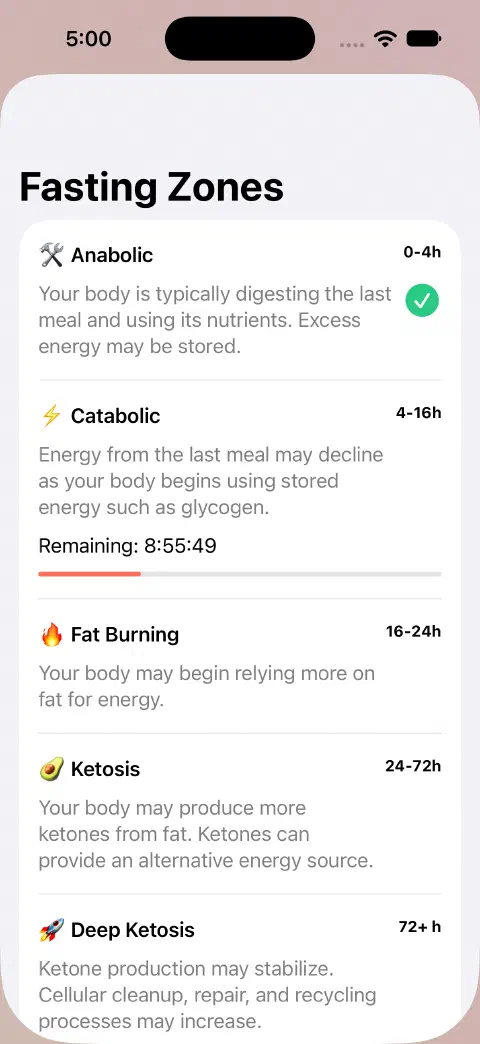
Zones and your goal are different
Your goal marks the duration you selected. Reaching that goal does not mean a particular zone has been measured, and reaching a zone does not end the fast. The actual timer still counts from your recorded start time.
Workout-adjusted zones
With the optional adjustment enabled and the required Health inputs available, recorded workouts can move the estimated zone progression ahead. They do not shorten the real duration of your fast or change the goal ring's progress. See workout setup.
Still need a hand? Contact me.