
Fasty for iPhone and Apple Watch
A simple way to track your fast.
Start your timer. Follow your fast from your Lock Screen or wrist. See your routine take shape over time.



In Fasty. On your Lock Screen.
No account. No ads. Your own routine.
Flexible goals and easy corrections
Fit fasting around your day.
Choose a goal that fits your routine. Change it when plans change. If you forget to start or stop the timer, edit the times or add your fast afterwards.1


- Pick a standard goal or enter your own hours, days or end time.
- Save the durations you use most as presets.
- Edit start and end times, or add a fast you forgot to record.
“i like that you can edit the start time since i often forget to start the timer.”
Canada ·
App Store reviews · excerpt
Live Activities, widgets and Apple Watch
Your fast, at a glance.
See how long you’ve been fasting without opening Fasty. Follow your progress on the Lock Screen, check a Home Screen widget, or look at your wrist.2
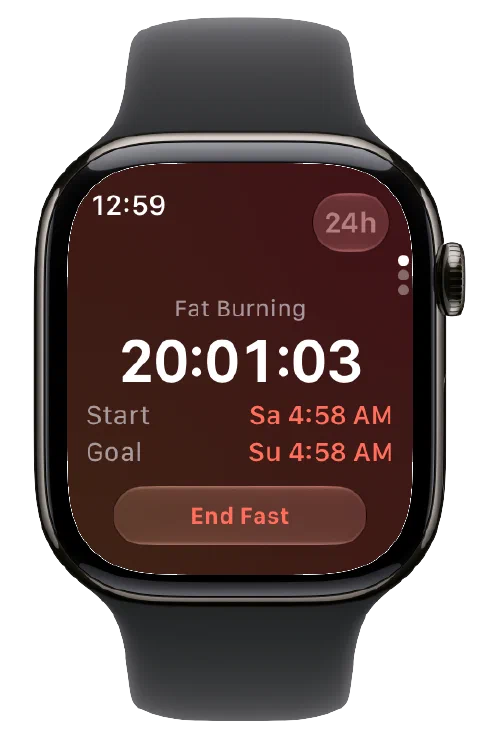

- Follow an active fast on your Lock Screen and in the Dynamic Island.
- Keep your timer on the Home Screen with a widget.
- Check, start and finish a fast from your Apple Watch.
“Love the live activity on the lock screen, beautiful simple app interface.”
United Kingdom ·
App Store reviews · excerpt
Fasting zones
Follow your progress, one zone at a time.
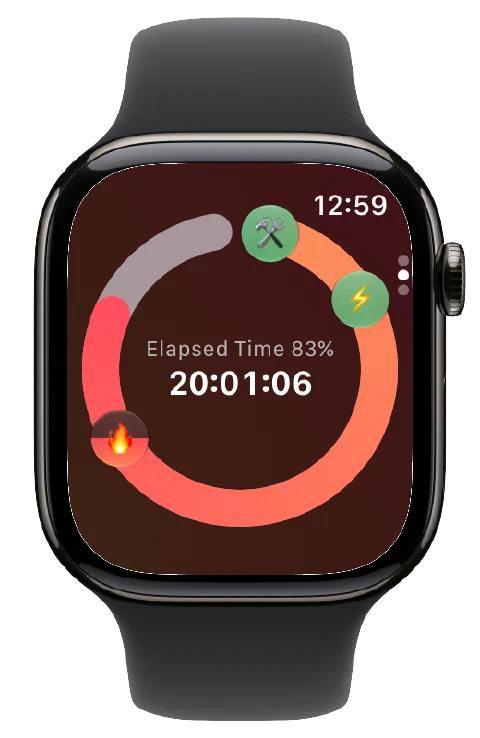
See your current fasting zone, learn what it means and find out what comes next.3

- Follow your progress through the fasting zones.
- Read an explanation of each fasting zone.
- Choose whether to show fasting-zone icons on your timer.
Exercise-adjusted fasting zones · Pro
Your workouts count, too.
Give your workouts credit. Fasty uses workout calories and resting energy from Apple Health to bring later fasting zones forward in your progress.4

- Give your workout a visible contribution to your progress.
- See fasting time and the activity adjustment side by side.
Totals, streaks and milestones
See how far you've come.
Every recorded fast adds up. See your total fasting time, completed fasts and milestones. Follow your current streak and look back at your best.5


- See your total fasting time, fast count and longest recorded fast.
- Follow your current streak and compare it with your best.
- Choose how qualifying days or fasts count toward your streak.
Start your next fast.
Choose your fasting goal, start the timer and follow your progress.
Timeline, calendar and statistics
Understand your fasting routine.
Revisit your fasts in a calendar, or see fasting and eating windows together on a timeline. Compare weeks and months to understand how your routine changes over time.6


- See fasts, eating-window gaps and streaks in one timeline.
- Select a calendar day to look at its recorded fasts.
- Compare fasting and eating-window time across weeks, months and years.
Optional weight tracking
Your fasts and weight, in one place.
Log your weight and follow your progress in the charts. Keep your weight and fasting history together in one app.7


- Log your weight, choose your units and set a weight goal.
- See weight history, charts and estimated trends.
- Optionally sync weight entries with Apple Health.
“I also like that it also has a simple weight log to easily keep track in one place without having to download another app.”
United States ·
App Store reviews · excerpt
Reminders and notifications
Don't forget your fast.
Get a reminder to start fasting and record your fast. Know when you reach your goal, enter a new fasting zone or finish your eating window.


- Set daily reminders to start fasting.
- Get notified when you reach your fasting goal.
- Choose alerts for fasting zones and your eating window.
Siri and Shortcuts
A shortcut to your fast.
Check and control your fast with Siri, Shortcuts and interactive snippets, without opening Fasty. Build automations around your routine.8


- Start or finish a fast and check your fasting state with Siri or Shortcuts.
- See your progress and control your fast in interactive snippets, without switching apps.
- Change your start time or set an exact goal end time without opening Fasty.
- Find, filter and sort recorded fasts, then use the results in other shortcuts.
Themes and personal preferences
Make Fasty feel like yours.
Choose a theme or create your own colours. Set how your timer counts, pick the statistics you see and decide what counts toward your streak.9

- Choose a theme or customize your colours and gradients.
- Show elapsed time or time remaining, with optional seconds.
- Choose which cards appear in Statistics.
- Count qualifying days or completed fasts toward your streak.
From people who use Fasty
Simple to use. More when you need it.
“Simple, clean, and then can be very in-depth if you chose.”
United States ·
App Store reviews · excerpt
“Great app. Love the widgets. It's simple and does the job well.”
Australia ·
App Store reviews
“Love the ease of use, and how you can change your goal during fast.”
United States ·
App Store reviews
“I love that I can use the widgets to quickly start and stop my fasts”
United States ·
App Store reviews · excerpt
“Good overview to track the week.”
United Kingdom ·
App Store reviews · excerpt
“Editing my start/end times, viewing my fasting history in the statistics section, and tracking my weight via Apple Health are my favorites.”
United States ·
App Store reviews · excerpt
Fasty Pro
More motivation. More control.
Give your workouts credit, build your routine and make Fasty your own. Follow and control your fast from your Home Screen, Lock Screen and wrist.4
Explore Pro and choose your upgrade in Fasty.
Give your workouts credit
See your workouts move your fasting-zone progress forward, with the exercise contribution shown beside your actual fasting time.
Build a habit that fits you
Save your usual fasting goals as presets. Choose how Fasty counts your streak so it reflects the routine you want to build.
Make it yours
Choose themes, customize colours and gradients, and pick the statistics that matter to you.
Control your fast everywhere
Start and finish from widgets and Live Activities. Edit your start time and goal through Shortcuts without opening Fasty.
All Fasty Pro features
Workouts and weight
- Exercise-adjusted fasting zones using Apple Health workouts
- Apple Health weight sync
Widgets and Live Activities
- Start and finish fasts from Home Screen widgets
- Start and finish fasts from Live Activities
- Full fasting-zone overview in large widgets
- Your last completed fast in large widgets
Apple Watch
- Edit the start time of an ongoing fast
- Follow your fasting-zone progress
- See your recent fasts in a chart
Your routine and appearance
- Themes, custom colours and gradients
- Choose which cards appear in Statistics
- Customize how your streak is counted
- Save your fasting goals as presets
- Browse earlier months in your fasting calendar
Advanced Shortcuts and snippets
- Change an ongoing fast's start time
- Set an exact goal end time
- Find, filter and sort recorded fasts for use in other shortcuts
- Cancel a fast from a shortcut
- Control your fast from interactive snippets
Help shape Fasty
- Vote on Fasty's roadmap
Before you get started
A few useful answers.
Can I choose my own fasting goal?
What if I forget to start or stop the timer?
Does reaching the goal end my fast automatically?
Does Fasty recommend a fasting routine?
How does Fasty know which fasting zone I'm in?
How does workout adjustment work?
What can I use on Apple Watch?
Can I track weight without Apple Health?
Can I bring my records with me?
What does Pro add, and can I restore a purchase?
More questions? Visit Help · Contact me
Still getting better
Fasty 0.0.107 — your last fast in the widget
Completed-fast summaries in larger widgets, iPhone Duo support and larger-text improvements.
I'm Kai Oelfke, the independent developer behind Fasty. Keep your fasting and weight records with CSV export, and follow the changelog to see what's new. Have a question? Contact me.
Ready to start?