
How do I log or correct my weight?
Enter dated measurements, choose kilograms or pounds, and remove an incorrect entry.
Manual weight logging and unit selection do not require Pro.
Save a weight record
- Open Statistics and scroll to Weight logging → Log weight.
- Enter the weight in the displayed unit. Check the Date and change it if you are entering an older measurement.
- Scroll until the Log weight button is visible above the keyboard, then tap it.
- Check Recent weights, or open the top-left tray button and select Weight, to confirm the saved value and date.
You can also use + from Statistics → Data (tray icon, top-left corner) → Weight to open a weight-entry sheet.
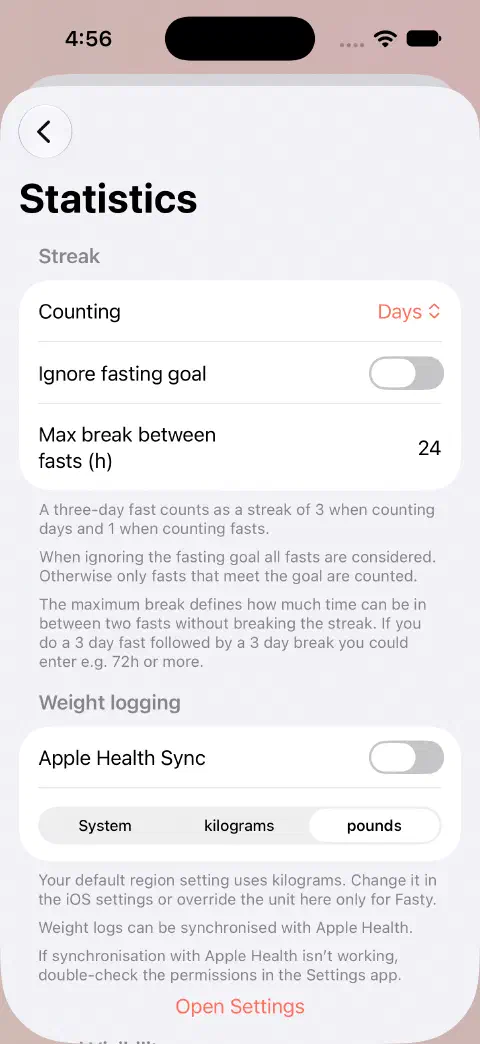
Choose kilograms or pounds
Open Statistics → Settings → Statistics. Under Weight logging, choose kilograms or pounds. System follows your region's measurement system. Changing this choice changes the display unit, not the underlying measurement.
Remove an incorrect entry
Open Statistics → Data (tray icon, top-left corner) → Weight, swipe left on the incorrect Fasty record, and delete it. Check its date first. To correct it, delete that entry and log the right value and date.
The list identifies Fasty records separately from external Health records. Manage records from other Health sources in the Health app rather than assuming that deleting a Fasty entry removes every copy.
For optional synchronization, see Apple Health. For progress, see weight goals and trends.
Still need a hand? Contact me.