For iPhone & Apple Watch

The simplest fasting tracker for iPhone.

Start your fast in a tap and follow it on your Lock Screen and Apple Watch.

Download on the App Store

Free download · No account · No ads

★ 4.9 · 94,000+ ratings worldwide

Fasty's active fasting timer with elapsed time, goal progress, start time and goal controls.
Fasty Live Activity on the iPhone Lock Screen with the active fasting timer, goal progress and End Fast control.

In Fasty. On your Lock Screen.

Goals & corrections

Fit fasting around your day.

Choose a fasting goal, change it when plans change and correct the times if you forget a tap.

  • Pick a standard goal or enter custom hours, days or an end time.
  • Edit start and end times, or add a fast you forgot to record.
  • Set a daily reminder to start fasting and an alert when you reach your goal.

“i like that you can edit the start time since i often forget to start the timer.”

kcwcc
Canada ·
App Store reviews · excerpt

Live Activities, widgets and Apple Watch

Keep your fast in sight.

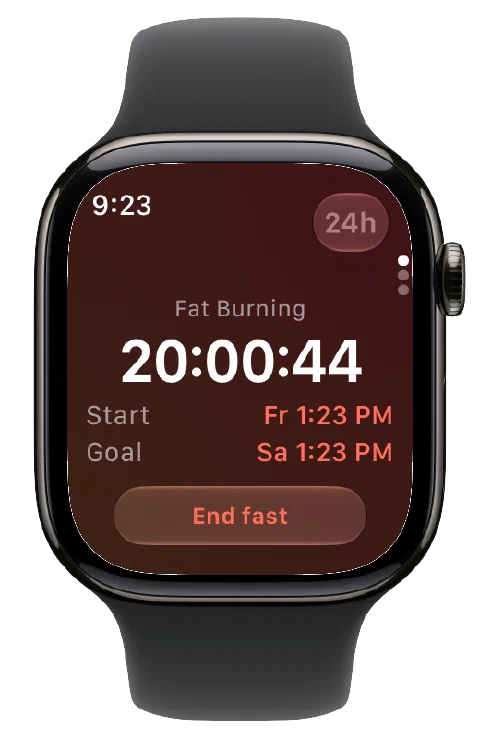
See how long you’ve been fasting from the Lock Screen, a Home Screen widget or your wrist.

  • Follow the timer on your Lock Screen and in the Dynamic Island.
  • Check, start and finish a fast from Apple Watch.
  • Use Siri or Shortcuts to start or finish a fast, set its duration goal and check the current fasting state.

“Love the live activity on the lock screen, beautiful simple app interface.”

andrejz2438
United Kingdom ·
App Store reviews · excerpt

Fasting zones

Follow each fasting zone.

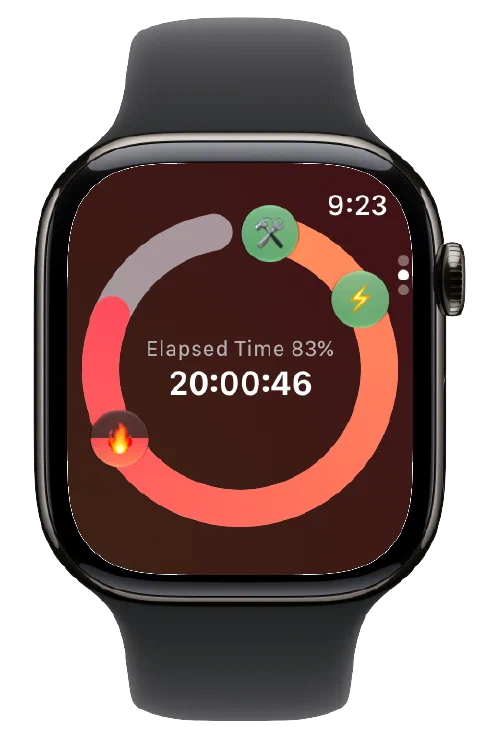
See the current zone and what comes next, with an explanation of each part of the fasting timeline.

  • See your current zone and what comes next.
  • Read what each zone means.
  • Get an alert when you enter a new zone.

Statistics, streaks & history

See a fasting habit take shape.

Watch completed fasts add up. Follow streaks and milestones, then look back at when and how long you fasted.

  • See total fasting time, completed fasts and earned milestones.
  • Compare the current streak with your best.
  • See this month’s fasts in the calendar and fasting and eating windows on the timeline.

Start your next fast.

Choose your fasting goal, start the timer and follow your progress.

Download on the App Store

Weight tracking

See weight progress alongside your fasts.

Log a weight and follow how it changes over time. Keep weight and fasting records together in one app.

  • Choose kilograms or pounds and set a weight goal.
  • Look back at dated records, charts and estimated trends.

“I also like that it also has a simple weight log to easily keep track in one place without having to download another app.”

autshi
United States ·
App Store reviews · excerpt

Fasty Pro

Get more out of every fast.

Pro adds workout credit, your own look and full control from anywhere. Choose a subscription or a one-time purchase in Fasty.

Download on the App Store

Your workouts count, too.

Fasty uses workout calories and resting energy from Apple Health to move estimated fasting-zone progress forward. Actual fasting time stays unchanged.

Workout adjustment needs permission to read workout and resting-energy data.

Make Fasty yours.

Choose a theme or create custom colors and gradients. See full fasting-zone progress in large widgets, with a summary of the last completed fast when you’re finished.

Control your fast from anywhere.

Start and end fasts from widgets and Live Activities. Change the start time with Shortcuts, use interactive snippets without switching apps and follow fasting zones on Apple Watch.

Also in Pro

  • Save fasting goals as presets.
  • Choose how streaks are counted.
  • Choose which cards appear in Statistics.
  • Browse earlier months in the fasting calendar.
  • Advanced Shortcuts: find and filter fasts, set an exact end time, cancel a fast, or log and find weight records on iPhone.
  • Sync weight records with Apple Health.
  • Vote on Fasty’s roadmap.

From people who use Fasty

Simple to use. More when you need it.

“Simple, clean, and then can be very in-depth if you chose.”

Dilrod7
United States ·
App Store reviews · excerpt

“Great app. Love the widgets. It's simple and does the job well.”

Lina~~~~
Australia ·
App Store reviews

“Love the ease of use, and how you can change your goal during fast.”

Paula Yvette
United States ·
App Store reviews

Before you get started

A few useful answers.

Can I choose my own fasting goal?
Yes. Pick a standard goal, enter custom hours or days, or choose an exact end time. You can change the goal during a fast.
What if I forget to start or stop the timer?
Edit the start time of an active fast, add a missed fast, or correct a recorded fast’s start and end times.
How are fasting zones calculated?
Fasty estimates zones from time spent fasting. Pro can adjust progress using workout and resting-energy data from Apple Health. Zones are estimates, not measurements of glucose or ketones. Fasty does not prescribe a fasting plan or provide medical advice.
What can I use on Apple Watch?
Check the timer, choose a goal and start or finish a fast. Complications and the Smart Stack keep progress nearby. Pro adds fasting-zone progress, start-time editing and a recent-fasts chart.
Can I bring my records with me?
Export fasting and weight records as CSV. Import compatible Fasty CSV files or completed fasts from supported Zero JSON exports.
What does Pro add, and can I restore a purchase?
Pro adds the features above with a subscription or one-time purchase. Open Purchases & Subscription in Fasty’s settings to restore or manage a purchase.

More questions? Visit Help · Contact me

Still getting better

Fasty 0.0.108 — weight actions in Shortcuts

Log and find weight records with Fasty Pro, plus editing and history improvements.

Read the update

Fasty is made by Kai Oelfke, an independent developer. Questions or ideas? Contact me.

Ready to start?

Download on the App Store